Shortcuts
| key | function |
|---|---|
| k or space | play / pause |
| j | go three seconds back |
| l | go three seconds forward |
| shift + enter | text from the cursor position to the beginning of the next field |
| m | add a marker in the current position |
| i | Add a start marker (IN) for the transcription range |
| o | Add a end marker (OUT) for the transcription range |
Shortcuts
| key | function |
|---|---|
| a | add a new region/subtitle line |
| e | edit the currently active region |
| esc | deactivate / leave edited texarea |
| scroll wheel over timeline | l left / right |
| alt + scroll wheel over timeline | zoom timeline |
Concept
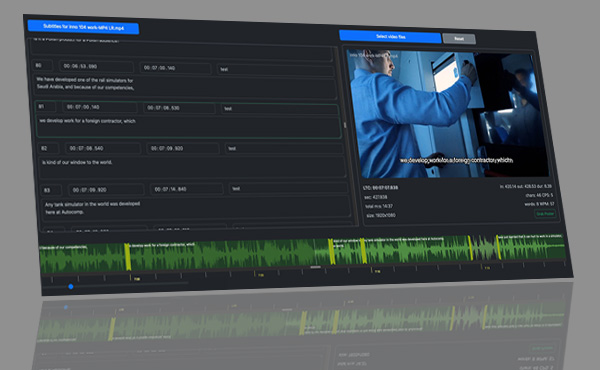
The video file has to be uploaded first. For a simple reason. The captions are based on the video timecode. A different order is possible, but it just doesn't make sense. And for this reason I do not want to write more lines of code :-) After uploading the video, a waveform and a timeline are created for the visual representation of the subtitles.
The second step is to upload the subtitles. These are automatically converted to VTT format. Once uploaded, a visualisation of the subtitle layout is created on the timeline. The subtitles can be edited in the left window.
If you have accidentally uploaded a different subtitle file to the one you want, simply refresh the page and repeat the process from the beginning. A minor inconvenience, but this is a simple subtitle editor, not a nuclear power station with a gigantic security system :-). And some things are just not worth making too complicated.
After editing, you can save the VTT file, and if you need a different format, you can use our subtitle converter.
It's just a simple online application!
You can work on a monitor with a resolution of 1280x720, but this will not be comfortable. In my opinion, the minimum resolution is 1920x1080.
Also older or weak computers may have a problem at the start. Firstly there is the processing of the audio for the waveform plotting, this takes a few to a few tens of seconds depending on the computer. Secondly, loading very long VTT files takes a while.
I use it most often for movies up to 45 minutes long and the number of subtitles around 400 to 800.
In general, it takes about 0.02 - 0.05 seconds to reformat one line of VTT for editing. The more lines, the longer the time per line, as this takes up quite a lot of computer memory. For example: 90 min movie, 2500 lines of subtitles. When loaded into a browser, this can take up around 2.5GB of computer memory. Unfortunately, the browser itself, irrespective of its type, causes a large memory overhead. If you are processing really large files with more than a thousand lines of subtitles, it might be better to use a regular offline application instead of online editing, since editing in a browser can be a little slower. But that is of course your choice :-)
On Chrome sometimes the video does not load. Just retry a few times and everything works. I have no idea why. But since I don't use Chrome, I'm not going to investigate it. Basically everything on the site writes for Firefox, it's my primary browser. I apologize to users of other browsers, but my site my rules.

General info
It is worth knowing the recommendations for creating subtitles. You can read a compendium on the subject on the Netflix website, for example, or on the BBC website. In normal life, you do not need all this information. Common sense is enough to create subtitles for X (Twitter), TikTok or Youtube. But perhaps one day this knowledge will allow you to make money?
The history of subtitles for movies is a fascinating journey that mirrors the evolution of cinema itself. What began as a necessity to bridge language barriers has transformed into a crucial element of film presentation, enhancing accessibility and cultural exchange. A brief history of the origins, types and formats of subtitles used in movies, including the innovative VTT format, both successful implementations and those that never gained widespread acceptance.
Origins and Early Development:
Subtitles made their first appearance during the era of silent films. As dialogues were absent, intertitles were used to convey crucial information and dialogue to the audience. With the advent of sound in the late 1920s, intertitles gave way to the inclusion of translated text at the bottom of the screen, creating a more seamless viewing experience.
Types of Subtitles:
Open Subtitles:Open subtitles are permanently embedded in the video file and cannot be turned off. They are commonly used for artistic expression or when the audience is assumed to be multilingual.
Closed Subtitles:
Closed subtitles, on the other hand, offer viewers the option to toggle them on or off. This format is preferred for a wider audience as it caters to both native and non-native speakers.
Real-Time Subtitles:
Real-time subtitles are generated on-the-fly during live broadcasts or events. This technology has significantly improved accessibility for live content, breaking down language barriers in real-time.
Popular Formats of Subtitles:
SRT (SubRip Subtitle):SRT is a widely used subtitle format that contains text and timing information. It is a simple and widely accepted format, making it compatible with a wide range of media players.
ASS/SSA (Advanced SubStation Alpha):
ASS/SSA formats offer more advanced styling options, including font types, colors, and positioning. These formats are commonly used for anime and other visually-oriented content.
VobSub (DVD Subtitles):
VobSub is a format specifically designed for DVDs, storing subtitles as a separate stream. It allows for multiple subtitle tracks and is still relevant in the DVD and Blu-ray era.
VTT (WebVTT - Web Video Text Tracks):
VTT is a format designed for web-based videos, enabling the integration of text tracks into HTML5 video. Its simplicity and compatibility with web standards have made it a popular choice for online streaming platforms.
Challenges and Unsuccessful Formats:
While many subtitle formats have gained acceptance, some innovations have struggled to find widespread use. For example, subtitling based on voice recognition, in which spoken words are transcribed in real time, has faced challenges of accuracy and synchronization. Similarly, holographic subtitling, which attempts to integrate text into the film space, has not gained popularity due to technical limitations.and concerns about visual distraction. Recently, due to the rapid development of speech recognition systems, real-time transcription systems are being used more and more.The history of subtitles for movies is a testament to the film industry's commitment to enhancing inclusivity and global accessibility. From humble intertitles to the sophisticated real-time subtitles of today, the evolution of subtitles has been marked by both successful and less popular innovations. With the addition of formats like VTT, tailored for the demands of online streaming, the cinematic experience continues to evolve, ensuring that language barriers are continually broken down for audiences worldwide.
